NewConnect Brain to your approved inventory, CRM records, documents and business tools.Explore Live Data Connectors
QualiBot
Log inBook a Demo
Security and governance

Control who can access customer data, what Brain can use and where QualiBot runs

QualiBot combines authentication, role-based authorization, account isolation, guarded outbound requests, audit capabilities and self-hosted deployment options.

Data and model use

QualiBot does not use customer conversation data to train a shared QualiBot model.

When an external model provider is configured, its processing and retention terms apply and must be reviewed separately.

Identity and access

Available controls

Email and password authentication
MFA through the supported two-factor flow
Google login when configured
SAML SSO for Enterprise
Administrator and agent roles
Enterprise custom roles
Account-scoped authorization
Inbox membership
Session and device controls

Microsoft OAuth authenticates mailbox connections.

AI control

What administrators manage

Whether Brain is enabled for an account
Which inbox has an assistant
Assistant instructions and guardrails
Knowledge sources
Enabled MCP and custom tools
Account-level model selection
Handoff behavior
Scope and oversight
Enabled tools apply consistently across every assistant in the account, so behavior stays predictable account-wideEvery MCP tool carries a read or write label administrators set when they enable itWrite-labelled MCP activity is logged to the conversation timeline the moment it runs, so your team can review every actionScope MCP tools and credentials to the data your team wants captured in session traces

External system credentials and permissions provide the enforcement boundary for least privilege.
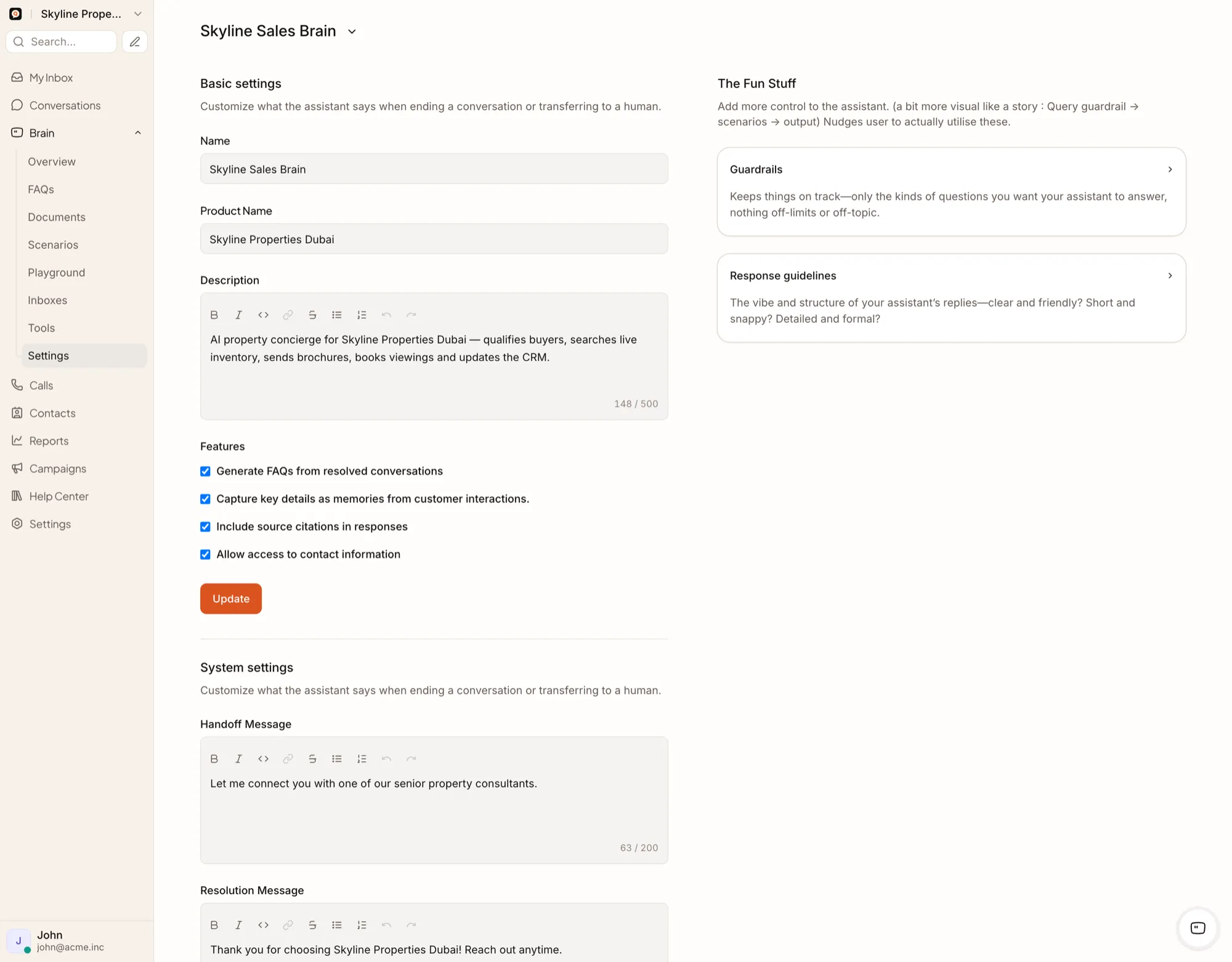
Brain assistant settings and controls
Connector network security

The safe-fetch layer

Self-hosted deployments can enable private-network requests through an installation setting when the architecture requires it.

HTTPS-only MCP and custom tool endpointsBlocking localhost and .local hostsBlocking literal IP endpointsPrivate and reserved IP protection by defaultRedirect revalidationSensitive-header handling across redirectsRequest-size and file-size limits
Credential and file safeguards
MCP and custom-tool authentication configuration sits inside your infrastructure security model, reviewed alongside your other systemsEvery connector authenticates with bearer, basic or API-key credentials scoped to that connector aloneTool inputs and outputs stay visible in the Brain session context your team can reviewEvery MCP-relayed file is size-limited before deliveryConnect only trusted, approved file sources for anything Brain relaysAdd a secure file-inspection layer for organizations that require additional scanning
Audit and governance

Enterprise capabilities may include

Audit logs
Custom roles
SLA policies
Brain agent sessions
Source citations
Tool-call traces in the session context
Write-labelled MCP activity in the conversation timeline
CSV export
Account feature controls

Retention, data-subject request and incident-response procedures are defined at the contract and operational level, alongside these technical controls.

In place today
Encryption in transit — HTTPS-only across every connector and custom tool endpointRole-based access — administrator, agent and Enterprise custom rolesAudit logging — timeline activity, tool-call traces and CSV exportSelf-hosted deployment — a supported Docker and Docker Compose modelCredential scoping — bearer, basic or API-key authentication scoped per connectorFile-size limits and trusted-source scoping on every relayed attachmentData minimization — Brain works only from the systems and sources your team approvesSession and device controls alongside SSO and MFA optionsPrivate-network and redirect protection on every outbound connector call
Compliance approach

QualiBot provides technical and deployment controls that can support an organization’s security and compliance program. Compliance depends on configuration, contracts, operations, hosting, data flows and applicable law.

Security FAQ

Answers for the security review

Can QualiBot be self-hosted?

Yes, through the supported Docker and Docker Compose deployment model.

Does QualiBot support SAML?

Yes, as an Enterprise feature.

Are MCP tools read-only by default?

MCP tools carry a read or write label administrators set; the connected system's own permissions provide the actual enforcement boundary.

Are tool outputs stored?

V2 Brain sessions can retain tool-call arguments and results in run context, visible to your team for review.

Are uploaded and relayed files malware-scanned?

Every relayed file is size-limited before delivery. Connect only trusted, approved file sources, and add your own file-inspection layer if your organization requires broader scanning.

Review QualiBot with security, infrastructure and procurement teams