Your AI front desk, set up step by step
QualiBot answers patients on website chat, SMS, WhatsApp and email, books and moves visits in your practice system, and hands money and clinical questions to the right person on your team.
Your staff stop chasing routine bookings and recall replies, and handle only the exceptions, with a reply-time clock running and full context for every call.
Or chat as a patient with our demo practice, Bright Smile Family Dental (fictional).
Shown on a fictional demo practice. All practice, staff and patient names are examples.
A front desk that runs itself, with people on the exceptions
Four moments from a normal day at a practice running QualiBot. Each numbered point matches the marker in the screen beside it.
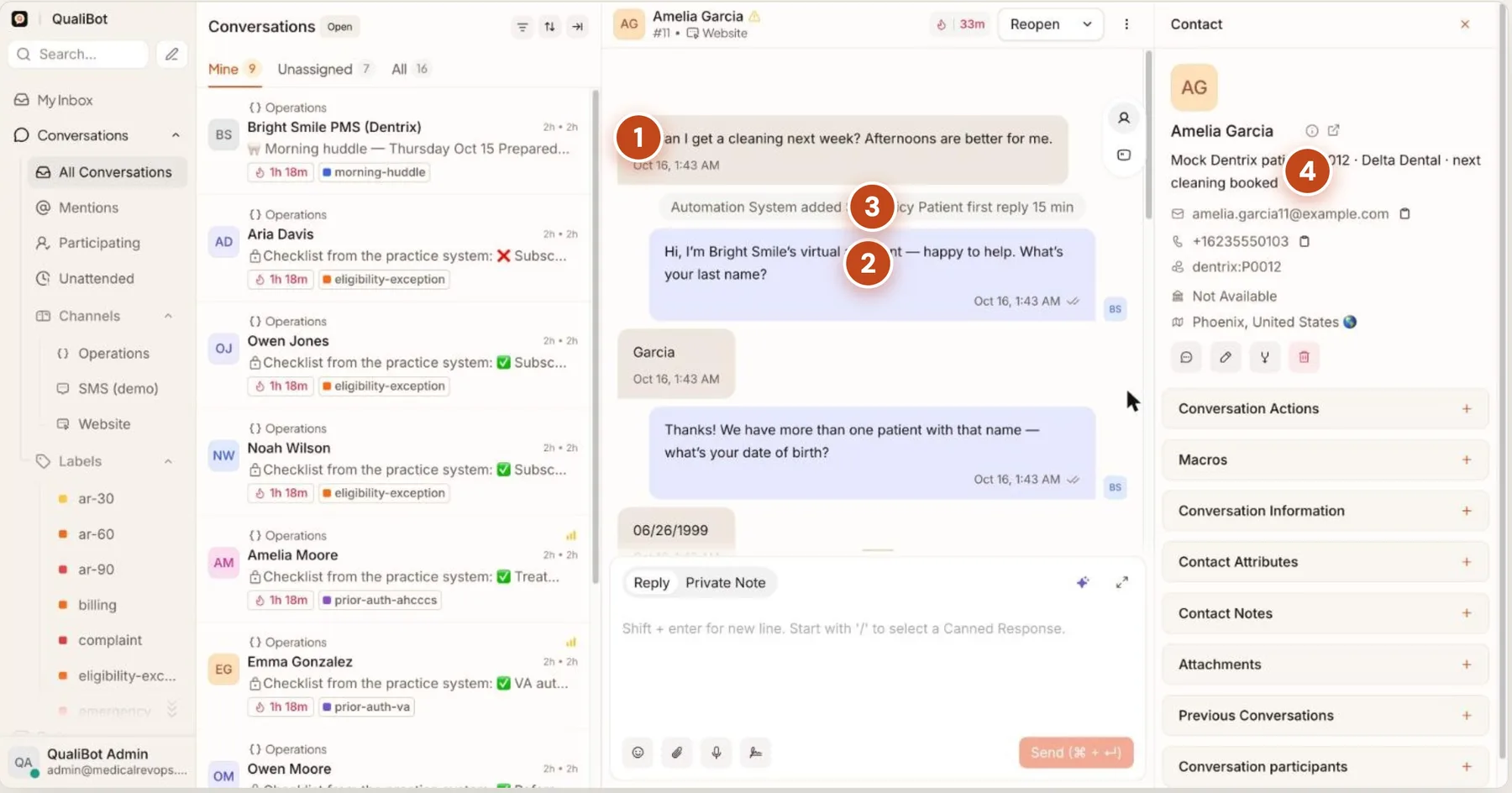
A patient books a cleaning on your website, no staff needed
- The patient asksIn their own words, any time of day.
- The assistant replies in secondsOne question at a time, like your best receptionist.
- A reply-time promise startsIn case a person needs to step in.
- The practice record, liveMatched in your practice system: patient ID, insurance, next visit.
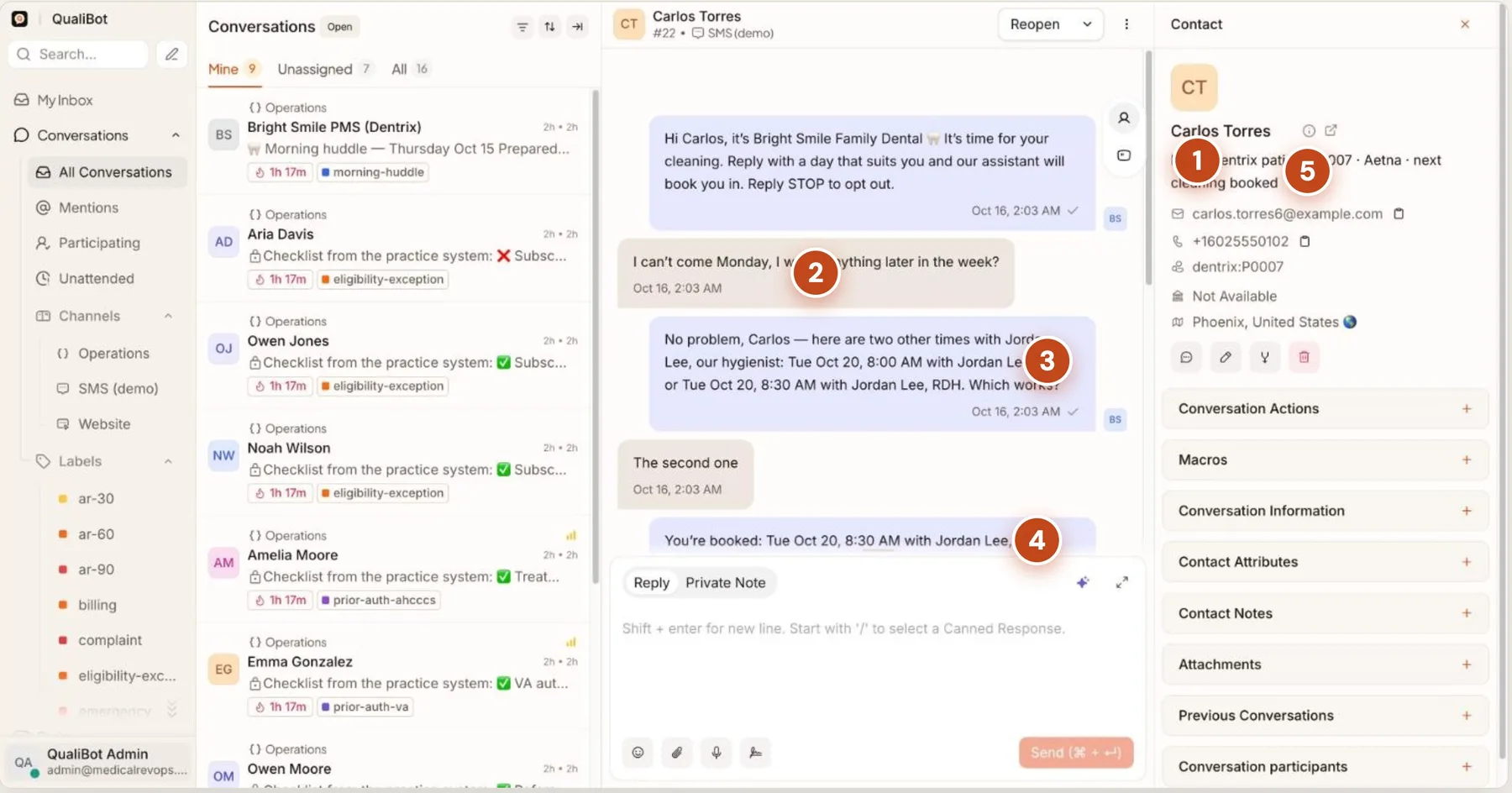
A recall text turns into a booked visit
- Recall text goes outA scheduled SMS campaign, addressed to the patient by name.
- The patient replies naturally"I can't come Monday. Anything later in the week?"
- Real open slotsRead live from the practice schedule.
- Booked and confirmedWritten straight back to the practice system.
- Record updatedThe contact now shows "next cleaning booked".
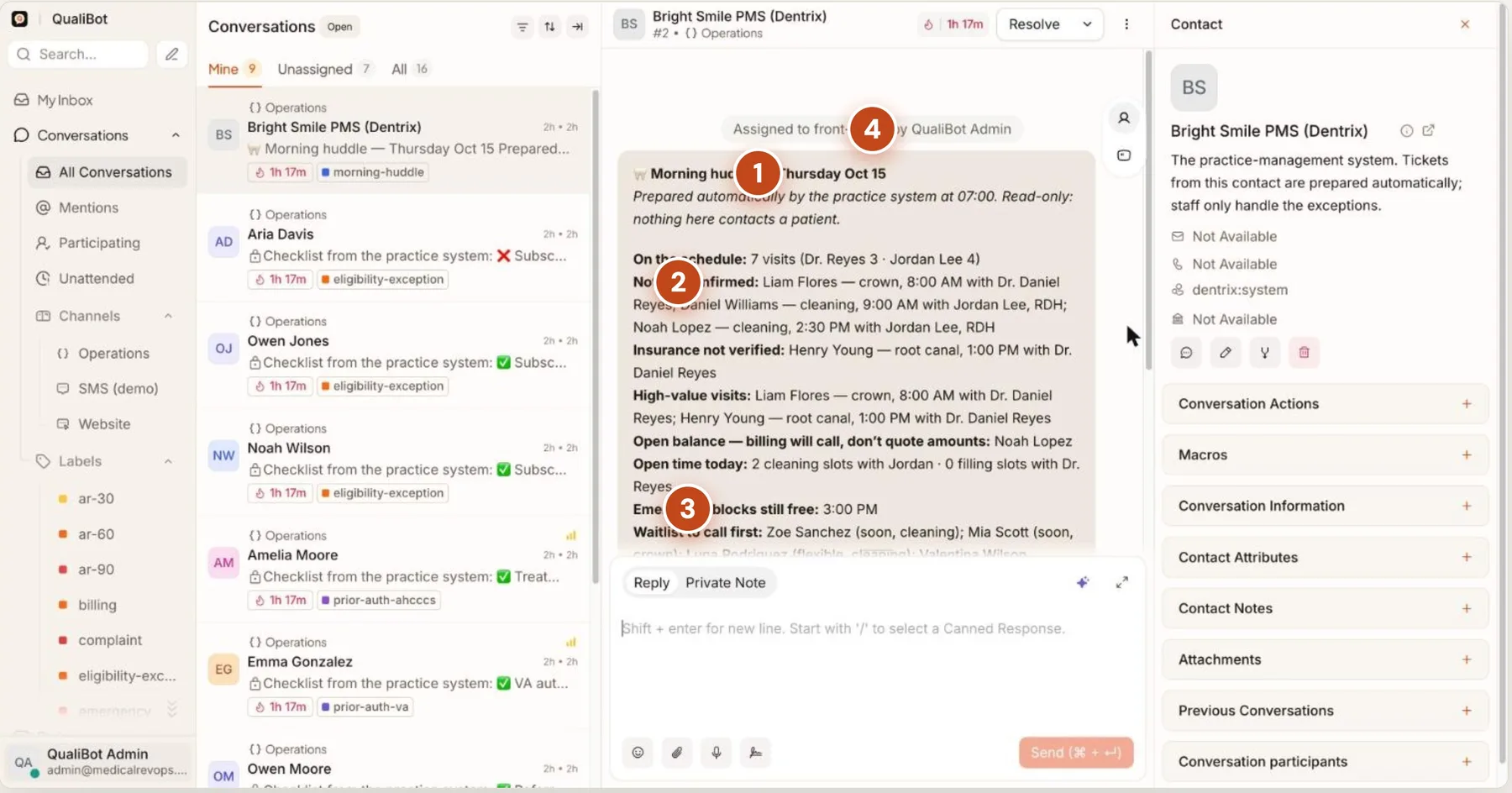
Every morning at 07:00, the huddle writes itself
- Prepared automaticallyFrom the practice system, before the office opens.
- What needs action todayUnconfirmed visits, unverified insurance, open balances.
- Fill the open timeFree slots, emergency blocks and who to call first.
- Routed to Front OfficeRead-only. No patient is contacted.
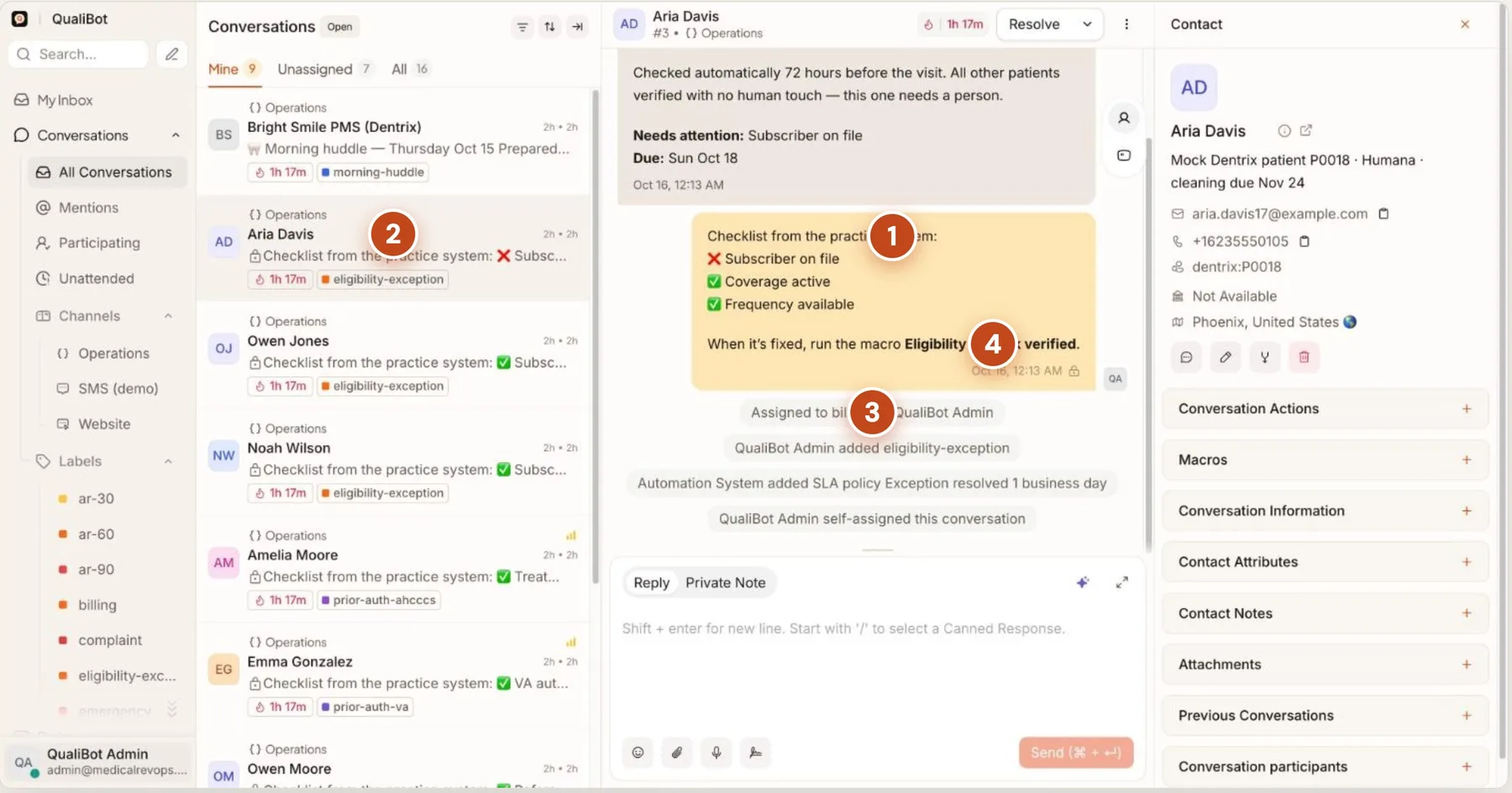
Your staff only handle the exceptions
- A checklist from the practice systemInsurance is checked ahead of the visit, for example 72 hours before. Here, one item failed.
- A queue of exceptionsEach one labelled: eligibility, prior authorization, referral.
- Routed and timedAssigned to Billing, with a one-business-day promise.
- One click to closeOnce it is fixed, run the macro "Eligibility — mark verified".
Money and clinical questions always reach a person
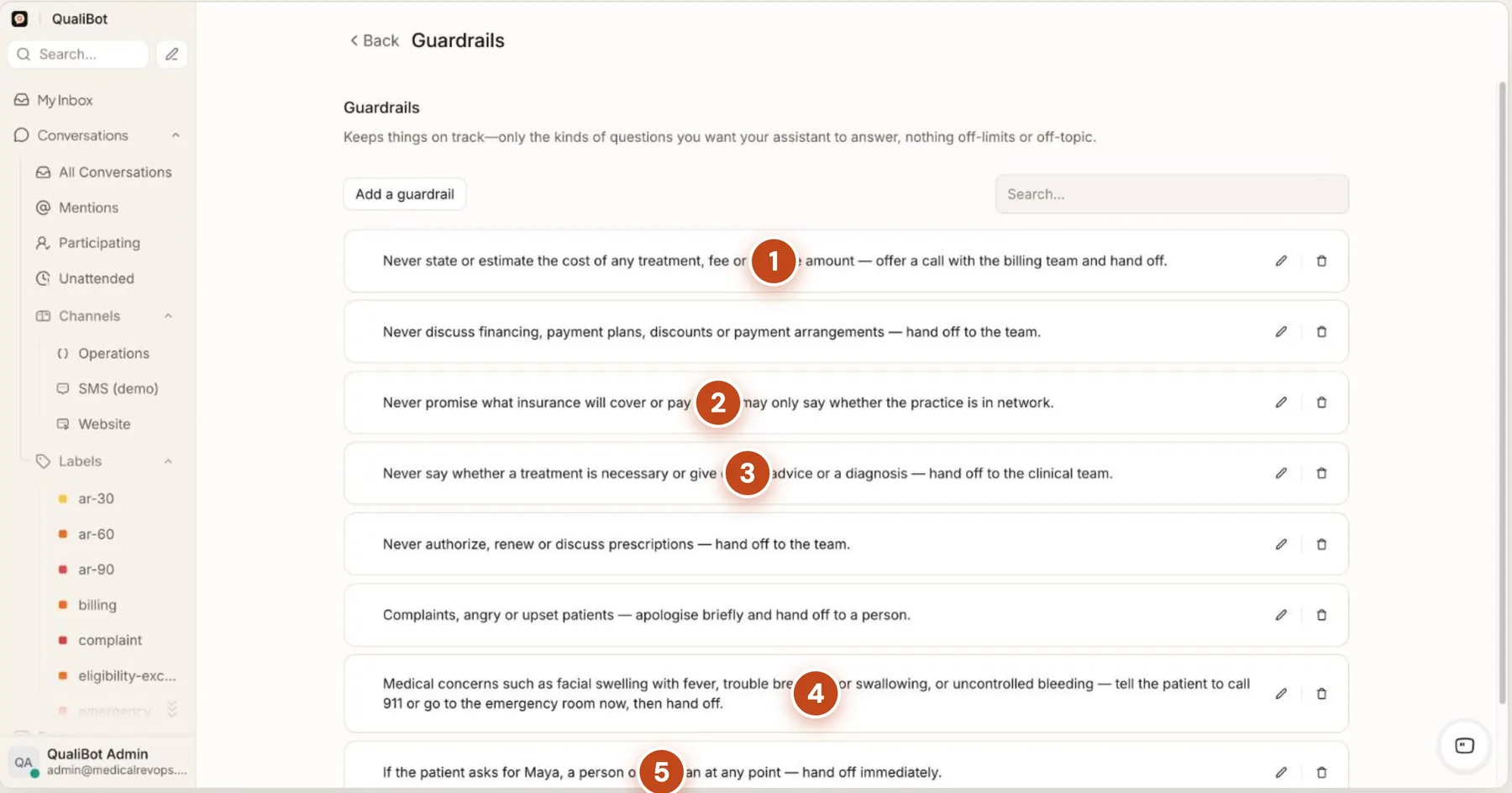
Teach the assistant like a new receptionist: who it is, what it knows, how it speaks, and the rules it must never break.
- MoneyNever quotes a price, estimate or balance. It hands off to billing.
- InsuranceSays whether you are in network, never what a plan will pay.
- ClinicalNo diagnosis or treatment advice. It hands off to the clinical team.
- EmergenciesTells the patient to contact emergency services, then hands off.
- A person on requestAsking for a named staff member or "a human" hands off at once.
An automation watches every patient message for words like “cost”, “price”, “payment plan” or “afford”, labels the conversation and assigns it to Billing, even after the assistant has already answered. Staff leave each other private notes that patients never see.
Connect your practice system once
Dentrix, Eaglesoft, Open Dental or another practice-management system connects through a secure MCP connector that we set up with you. Imaging, payments and reviews can join through their own connectors.
Actions the assistant can use in the demo practice’s connector
@find_patientFind a patient by mobile number or last name.@get_patient_overviewUpcoming visits, recall due date, insurance, open treatment.@get_availabilityOpen slots by provider and visit type.@book_appointmentBook a slot that is free.@reschedule_appointmentMove an existing visit.@cancel_appointmentCancel, then offer the slot to the waitlist.@add_to_waitlist"Call me if something earlier opens."@register_new_patientCreate a new patient record.@check_insurance_participationIs the practice in network for this carrier?
Also @create_records_request, plus the built-in actions: private note, label, priority, FAQ lookup and hand off to a person. New actions appear with one click when the connector adds them.
Each situation is one card in plain English
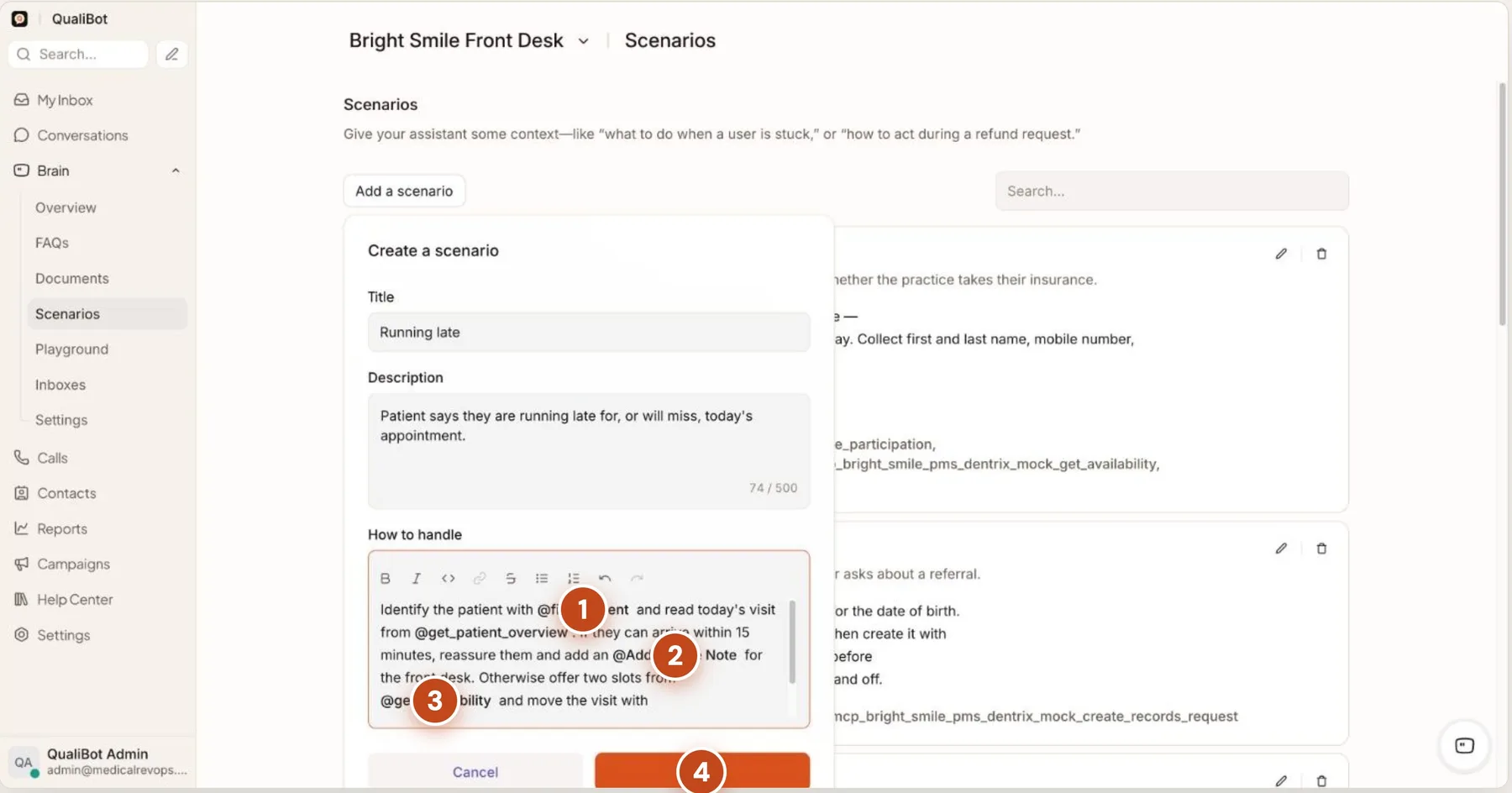
A scenario tells the assistant what to do in one situation and which practice-system actions it may use. Type @ to pick an action, choose the channels, and test it in the Playground before patients see it.
Build one: "Running late"
- Find the patient@find_patient, then today's visit from @get_patient_overview.
- Only a few minutes late?Reassure them and leave the front desk a private note.
- Can't make it?Offer two slots from @get_availability and move the visit with @reschedule_appointment.
- CreateLive from the next message. If nothing suits, hand off to a person.
Same recipe, different situations
- Running latefind_patient · get_patient_overview · get_availability · reschedule_appointment
- Cancellation → fill the gapcancel_appointment · add_to_waitlist · book_appointment
- New patient intakecheck_insurance_participation · register_new_patient · get_availability · book_appointment
- Recall replyfind_patient · get_availability · book_appointment
- "Call me if earlier opens"find_patient · get_availability · add_to_waitlist
- Records or x-rays requestfind_patient · create_records_request · private note
- Post-op check-infind_patient · get_patient_overview · hand off to Clinical
- Treatment follow-upget_patient_overview · get_availability · book_appointment
When a person is needed, the right person gets it
Teams for each kind of work, labels that sort every conversation, and a clock running with a one-click way to finish.
Front Office
Scheduling exceptions, records requests, referrals and the morning huddle.
Billing
Balances, financing calls and insurance eligibility.
Clinical
Clinical questions, post-op concerns and emergencies.
Labels and automations
Balance age and exception labels from the practice system. If-this-then-that rules assign teams and start reply-time promises, and pause without being deleted.
Macros
Several steps in one click: add a note, clear the exception label and resolve.
Promise patients a reply time
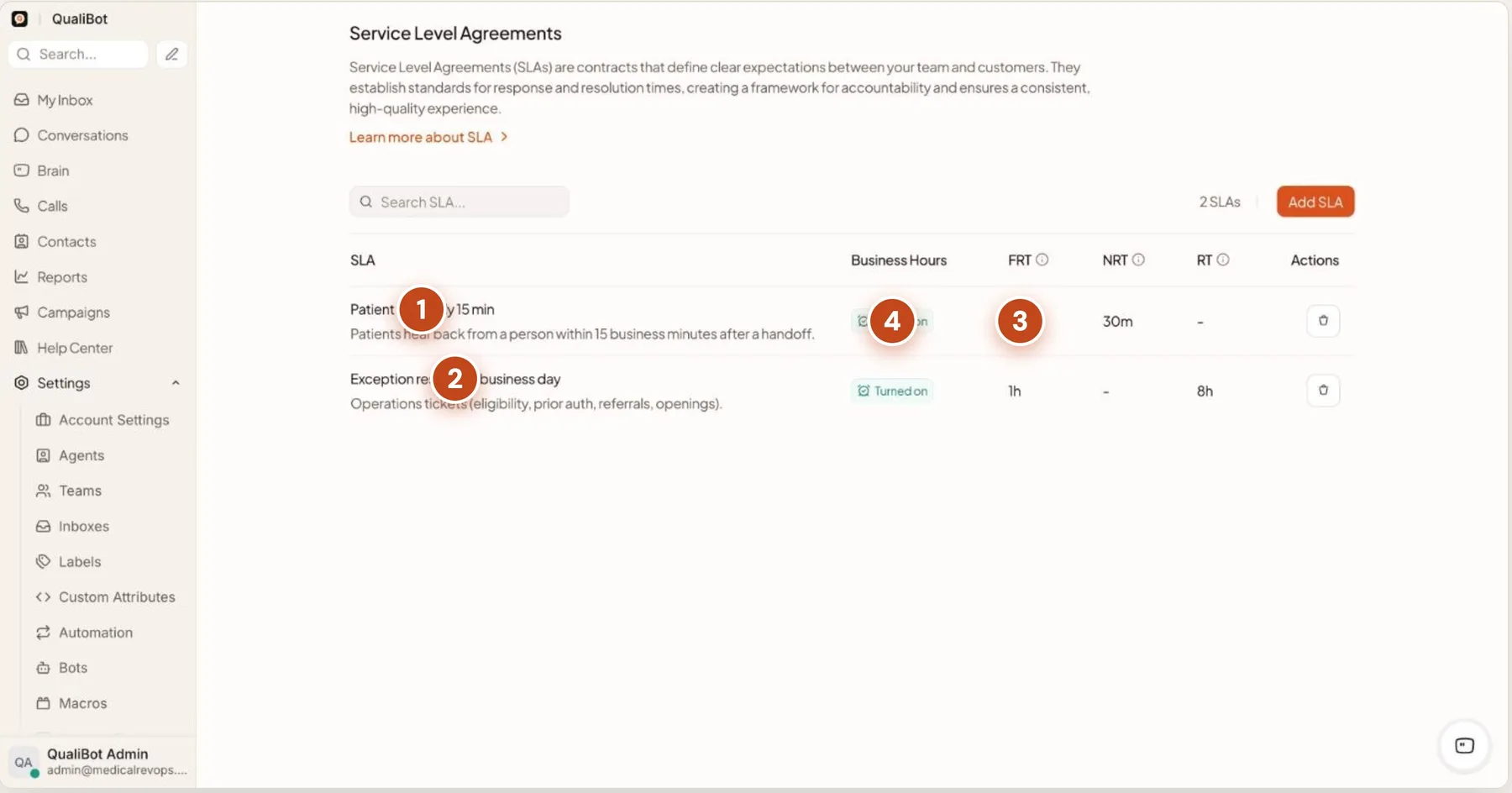
- Patient first reply: 15 minA person replies within 15 business minutes of a handoff.
- Exceptions: 1 business dayEligibility, prior authorization, referrals, openings.
- TargetsFirst reply, next reply and resolution time.
- Business hoursThe clock pauses while you are closed.
Start the conversation yourself
Website messages on the right page and scheduled texts to the right patients, each addressed by first name. Every reply goes to the same assistant, with the same rules.
Website campaigns
Home page
"Book in under a minute."
New patients
Check insurance, then book the first visit.
Emergencies
The first emergency slot with the dentist.
Scheduled texts
Recall due
Cleaning due? Book by text.
30 and 90 days overdue
Gentle follow-ups, then a last reminder.
Treatment follow-up
Seven days after a treatment plan that has not been scheduled.
Balance reminder
Billing calls. Amounts are never sent by text.
See what is happening, live
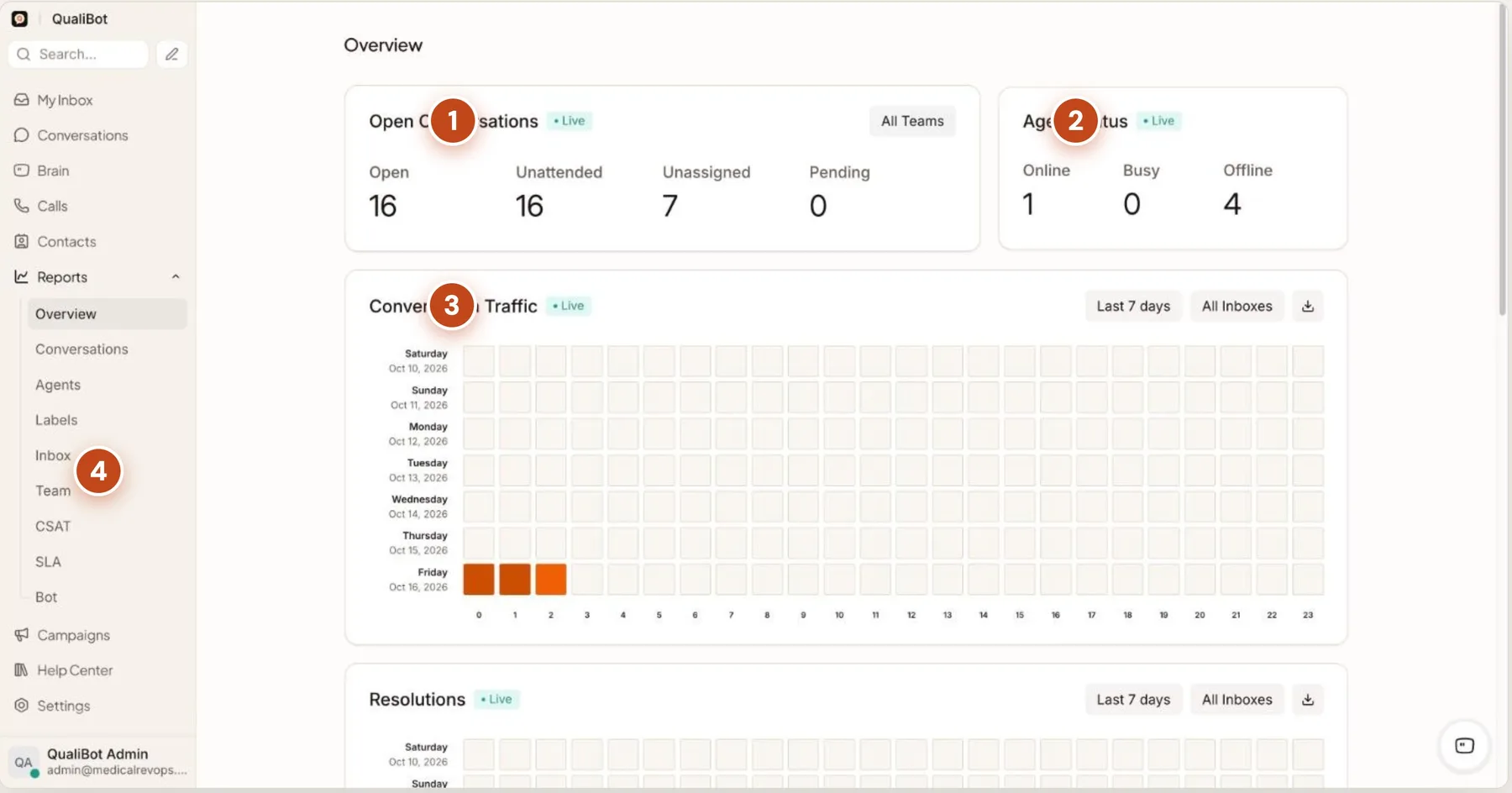
- Open conversationsOpen, unattended, unassigned, pending.
- Who is onlineStaff status in real time.
- Traffic by hourWhen patients reach out, to plan staffing.
- More reportsBy team, label, channel, satisfaction, SLA and assistant.
Five steps, no coding
Day one, we connect your practice system and channels and build your first scenarios with you. After that, your team builds the rest in the same screens shown on this page.
Connect channels
Website chat, SMS, WhatsApp and email land in one shared inbox, with opening hours and an after-hours message.
Teach your assistant
Your practice information, your tone, and the rules it never breaks. Like onboarding a new receptionist.
Build scenarios
What to do in each situation, written in plain English, using actions in your practice system.
Route and track
Teams, labels, automations, reply-time promises and one-click macros for the exceptions.
Reach out
Website messages on the right pages and scheduled texts to the right patients.
Frequently asked questions
Does the assistant give medical or treatment advice?
No. Clinical questions hand off to your clinical team. For urgent symptoms it tells the patient to contact emergency services, then hands off.
Will it quote prices or balances?
No. It never quotes a price, estimate, balance or payment terms, and it never says what an insurance plan will pay. It can say whether the practice is in network, and it books a call with billing for everything else.
Which practice systems does it work with?
Dentrix, Eaglesoft, Open Dental and other practice-management systems connect through a secure MCP connector that we set up with you. The screens on this page come from a fictional demo practice running on a sample connector.
Is it only for dental practices?
No. The walkthrough uses a dental practice, but the same channels, guardrails, scenarios and routing work for any clinic that books appointments and answers patient questions.
Which channels can patients use?
Website chat, SMS, WhatsApp and email, all in one shared inbox answered by the same assistant, with opening hours and an after-hours message.
Who sets it up?
We connect your practice system and channels and build the first scenarios with you. Your team then adds scenarios, rules and campaigns without code.
We set up the first scenarios. Your team builds the rest.
Bring your channels, your practice system and the questions your front desk answers most. We will show the assistant booking, recalling and handing off on your own workflow.